ICICI FASTag: Things you must know
 Add CMV360 on Google
ICICI Bank is one of India's largest banks, and it has been authorized by NHAI/NPCI to provide FASTag services for the National Electronic Toll Collection (NETC) program.

By Priya Singh
ICICI Bank is one of India's largest banks, and it has been authorized by NHAI/NPCI to provide FASTag services for the National Electronic Toll Collection (NETC) program.
The FASTag program, also known as the National Electronic Toll Collection (NETC), is currently in use at 450+ toll plazas along national and state highways to collect toll fees digitally via an RFID Technology called the FASTag. The ICICI FASTag is an ideal solution for a trouble-free trip on national highways. The ICICI FASTag is associated with a prepaid account from which the applicable toll fee is deducted.
ICICI Bank is one of India's largest banks, and it has been authorized by NHAI/NPCI to provide FASTag services for the National Electronic Toll Collection (NETC) program. ICICI FASTag is a simple-to-use, rechargeable RFID (Radio Frequency ID) tag that enables automatic toll deduction and allows you to pass through toll plazas without stopping to pay toll fees in CASH.
How can I buy ICICI FASTag?
FASTag can be purchased through the ICICI Bank iMobile App.
- Sign in to the ICICI Bank iMobile App.
- Enter the four-digit pin you received on your mobile.
- Select the FASTag icon from the Homescreen's Shop Tab.
- Enter and confirm the registration number of the vehicle.
- Choose your vehicle's model.
- Read and check the Terms and Conditions box before clicking Proceed.
- Enter your delivery address and email address.
- Tap on Proceed after selecting the account from which the amount will be debited.
- Check the pre-confirmation page to ensure that all of the information is correct, then click Proceed.
- This completes the process of purchasing a FASTag.
FASTag can be purchased through ICICI Bank Internet Banking.
- Log into ICICI Bank Internet Banking.
- Click on Payments and Transfers.
- Select Buy/Recharge FASTag.
- Enter your vehicle's registration number, as well as the make and model.
- Enter the shipping address.
- Select the account to be debited, check the T&C box, and click Proceed.
- Check the pre-confirmation page to ensure that all of the information is correct, then click Proceed.
- Examine your Payment summary and confirm the transaction.
- Your FASTag will be delivered to the specified address shortly.
FASTag can be purchased through WhatsApp
You can now apply for a FASTag online via ICICI Bank's innovative WhatsApp banking service.
- First, add the phone number '8640086400' to your contacts list.
- Simply send a 'Hi' message to 8640086400 on WhatsApp.
- You'll get a welcome message and then type “menu”.
- For ICICI FASTag services, enter '3'.
- Type '3' once more to request a new Tag.
- You will be given a link that will take you to the ICICI Bank's FASTag application page.
- Fill in the necessary information and upload any necessary documents.
- After you pay, you will receive the FASTag at the address you specified within a few days.
Once you have received your FASTag, you can easily recharge it using various payment platforms such as UPI, Internet Banking, and so on.
How can I recharge my ICICI FASTag?
ICICI FASTag simplifies your life in that it can be easily recharged online. You can recharge your FASTag with a Credit Card, a Debit Card, or a National Electronic Funds Transfer (NEFT).
To recharge your FASTag online, go to the ICICI Bank's FASTag facility's online portal and enter your login credentials. Then, in the recharge section, enter the amount you want to recharge. You can pay this amount using any of the methods mentioned above.
Your FASTag account can be linked to either your wallet or your bank account. If your FASTag account is directly linked to your bank account, the toll charges will be deducted from the account automatically. You can even avoid having to recharge your wallet regularly this way.
What are the Charges/fees for ICICI FASTag?
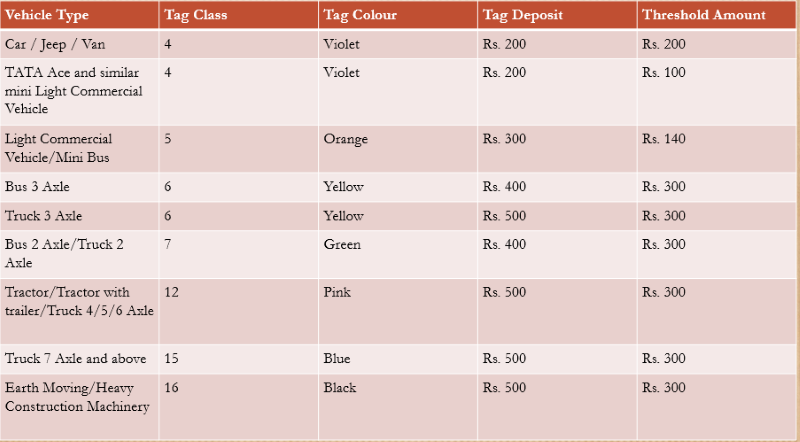
ICICI Bank's FASTag facility is extremely cost-effective. The fees depend on the type of vehicle, and the colour-coded tags.
To buy your FASTag, you have to pay the tag issuing fee, a security deposit for the tag, and a minimum recharge amount, as shown below.
ICICI FASTag fees
(1) FASTag Membership Fee: Rs. 99.12 (including GST)
(2) Amount of a one-time tag Security deposit
ICICI Bank FASTag Customer Service Number
To learn more about FASTag, contact ICICI Bank's 24-hour customer service at:
Customer Service Phone Number: 1800-2100-104
Send an SMS to 5676766 in the format ITOLL(Space)Pincode(Space)Name, for example, ITOLL 452001. Mr Deepak Kumar. Within two working days, an ICICI Bank representative will contact you to process your FASTag request.
What are the advantages of using ICICI FASTag?
- There is no need to carry cash for toll transactions, which saves time.
- Vehicles move almost continuously, resulting in lower fuel costs.
- ICICI FASTag can be recharged online using a credit card, debit card, NEFT/ RTGS, or net banking.
- SMS alerts for toll transactions, low balances, and other events are available.
- Customers can check their ICICI FASTag account statements and recharge online through this portal.
- The ICICI FASTag is valid for up to 3-5 years.
CMV360 always keeps you up to date on the latest government schemes, sales reports, and other relevant news. So, if you're looking for a platform where you can get relevant information about commercial vehicles, this is the place to be. Stay tuned for new updates.

Hi there! I'm Priya. From trucks to vans and everything in between, I'm here to provide you with up-to-date in .....